If you’ve ever worked in industrial automation, commercial building management, or manufacturing, you know how critical DIN rail energy meters are. These compact, rail-mounted devices are the unsung heroes of energy monitoring, giving you the data you need to cut waste, comply with regulations, and keep operations running smoothly. But like any piece of electrical equipment, they don’t stay reliable forever. As a supplier of DIN rail energy meters, I talk to customers every week who come to us with issues: their meter isn’t recording usage, it’s giving inconsistent readings, or it’s throwing error codes they don’t understand. The good news is that you can check if your DIN rail energy meter is working properly without calling a technician or pulling it out of the panel—most issues are easy to diagnose on your own, with basic tools and a little know-how. DIN Rail Energy Meter
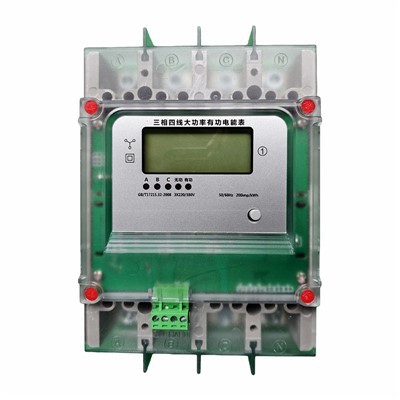
Let’s start with the absolute basics: a DIN rail energy meter’s primary job is to measure electrical energy, so if it’s not doing that, it’s not working. First, confirm it’s getting power. This sounds trivial, but I’ve seen dozens of cases where a meter stopped working because a circuit breaker tripped, a loose wiring connection cut power to the device, or the power supply voltage was outside the meter’s operating range. Most DIN rail meters have a small power LED light on the front panel. If that LED is off, first check the main circuit breaker feeding the meter. If the breaker is on, use a multimeter to test the voltage at the meter’s power input terminals. DIN rail energy meters typically operate on 12V DC to 240V AC, depending on the model, so make sure the reading matches what the meter’s spec sheet says. If the voltage is correct but the LED is still off, that might point to a faulty internal power supply, and you’ll want to follow up with a professional or your supplier for a replacement.
Next, verify the wiring is correct. Misconnections are one of the most common causes of a non-functioning or inaccurate DIN rail meter. These devices require precise wiring for both power and current (CT) connections, depending on whether it’s a single-phase or three-phase model. For single-phase meters, there are usually four terminals: L1 (line), N (neutral), L1 load, and N load. A common mistake here is wiring the load to the wrong terminals, or mixing up line and neutral, which can prevent the meter from registering any energy use. For three-phase meters, you have three line terminals and three current transformers (CTs), each of which must be connected in the correct order and polarity. If a CT is reversed or connected to the wrong phase, the meter will either give a wildly inaccurate reading or stop working entirely. If you’re unsure about your wiring, double-check against the meter’s installation manual—we provide clear, step-by-step diagrams with every one of our meters, so this is a resource I always recommend customers use first. A quick visual inspection of the terminals will also catch loose wires, which can cause intermittent power loss or erratic readings.
Once you’ve confirmed power and wiring are correct, it’s time to check the energy readings themselves. The easiest way to test accuracy is with a known load. Grab a device with a well-documented power draw—like a space heater, a desk lamp, or a small motor. Let’s say you use a 1,000 watt space heater plugged into a dedicated circuit. First, use a separate multimeter to measure the actual power draw of the heater (some older models might pull a little more or less than their label). Note the time you turn the heater on, then run it for exactly one hour. After one hour, check the reading on your DIN rail meter. If the meter is working properly, it should show approximately 1 kWh (or the corresponding number for your multimeter’s measurement) of energy used. If there’s a gap larger than 2-3%, that’s a sign of a problem—common issues here include outdated meter calibration, faulty CTs, or incorrect CT ratio settings. For example, if you have a 50A CT connected to a meter set for 100A, the reading will be half of what it should be. Most modern DIN rail meters let you program the CT ratio via DIP switches, a display menu, or software, so double-check that setting against the CT you’re using.
If your meter has a digital display, check for error codes. Unlike analog meters, digital DIN rail models use standardized error codes to signal issues, and most of these are easy to fix. For example, a “No CT” code means the current transformers aren’t connected or are loose, a “Phase Loss” code points to a missing voltage signal on one of the phases, and a “Cal Error” code means the meter’s internal calibration has drifted. If you see a code you don’t recognize, your installation manual should have a list of error codes and troubleshooting steps—we make ours available as a downloadable PDF on our website, so customers can access it anytime. If the error code persists after fixing the obvious issues (like tight wiring), that might mean a hardware fault, and you’ll want to reach out to your supplier for support.
Another often-overlooked check is the communication link, if your meter is a smart model with Modbus, Ethernet, or another communication protocol. Many industrial DIN rail meters feed data into building management systems (BMS) or energy management software, so if the data isn’t showing up in your system, the meter might seem broken even if its local reading is correct. Start by checking the communication LED on the meter—most models have a TX (transmit) and RX (receive) LED that blink when data is being sent and received. If those LEDs aren’t blinking, use a network analyzer or serial tester to confirm the communication cable is wired correctly (for Modbus, a common mistake is swapping the A and B wires) and that the baud rate, parity, and slave address match the settings in your BMS. Even a small mismatch in baud rate can prevent data from transmitting, so double-check those settings if you’re troubleshooting communication issues.
Environmental factors can also cause a DIN rail energy meter to malfunction, and these are easy to overlook. DIN rail meters are designed for indoor use, but if they’re installed in a dusty, humid, or excessively hot location (like near a boiler, in an unventilated electrical closet), dust can build up on the circuit board over time, leading to loose connections or short circuits, and high humidity can corrode wiring terminals. If your meter is in a harsh environment, inspect it for dust buildup on the display or terminals, and wipe it down with a soft, dry cloth (never use liquid cleaners, which can damage the internal electronics). Also, make sure the meter is rated for the ambient temperature of its installation space—most standard DIN rail meters work between -10°C and 55°C, but if you’re installing it outdoors without an enclosure, you’ll need a meter rated for outdoor use, which can handle temperatures from -40°C to 70°C. Installing a non-rated meter in extreme temperatures is a common cause of premature failure.
What if you’ve checked all these things and the meter still isn’t working? It might be time for a more formal accuracy test. For industrial settings with high energy loads, you can use a portable power quality analyzer to compare the DIN rail meter’s readings against a calibrated reference device. These analyzers are more precise than a multimeter, and they can test for harmonics, voltage fluctuations, and other factors that might affect the meter’s accuracy. If the reference analyzer shows a significant difference (over 5%) from your DIN rail meter, that’s a clear sign the meter needs calibration or repair. Most suppliers, including us, offer calibration services for DIN rail meters, and we recommend recalibrating your meter every 2-3 years, even if it seems to be working fine, to ensure long-term accuracy.
As a DIN rail energy meter supplier, I’ll be honest: no device is immune to wear and tear. Even with proper maintenance, meters can fail due to manufacturing defects, power surges, or accidental damage. That’s why it’s important to invest in quality meters from reputable suppliers, and to test them regularly—quarterly for critical applications, and annually for less demanding ones. The good news is that most issues are preventable with simple checks: verifying power and wiring, testing with a known load, monitoring error codes, and keeping an eye on environmental conditions.
If you’ve tried these steps and are still having trouble, or if you’re looking to upgrade your energy monitoring setup with reliable DIN rail meters for your facility, don’t hesitate to connect with our team. We’ve been supporting industrial, commercial, and residential customers with energy monitoring solutions for years, and we’re here to help you diagnose issues, choose the right meter for your needs, and ensure your energy data is accurate and reliable. Whether you need a single meter for a small office or a bulk order for a large manufacturing plant, we can work with you to find the right solution.
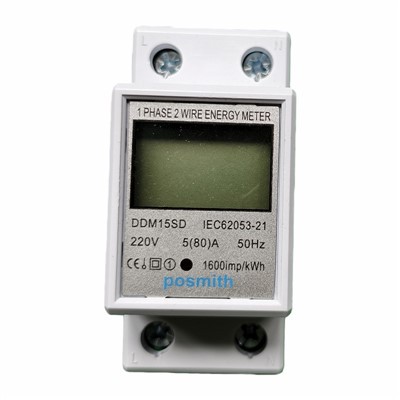
I can also provide additional resources, including installation manuals, error code guides, and calibration tips, to help you keep your meters working properly long after installation. Just reach out to our team to start a conversation about your energy monitoring needs—we’re ready to assist with any questions you have.
DIN Rail Energy Meter References
- Schneider Electric. (2022). DIN Rail Energy Meter Installation and Maintenance Guide.
- International Electrotechnical Commission (IEC). (2021). Standard for Electricity Meters, Part 1: General Requirements.
- Siemens Industry. (2023). Troubleshooting Smart DIN Rail Energy Meters: A Practical Guide.
- National Electrical Manufacturers Association (NEMA). (2022). Guidelines for Installation of DIN Rail Devices in Commercial and Industrial Panels.
Zhejiang Qunte New Energy Technology Co., Ltd.
As one of the most professional din rail energy meter manufacturers in China, we’re featured by quality products and good price. Please rest assured to buy discount din rail energy meter made in China here from our factory. We also accept customized orders.
Address: No. 56, Fengxi Road, Tang’ao Yu Village, Liushi Town, Yueqing City, Wenzhou City, Zhejiang Province
E-mail: 251951196@qq.com
WebSite: https://www.zjqtmeter.com/
